


Buzar: Live Video Chat
4.5101.00 Reviews
App Specs
- Version
- 1.2.0
- Updated On
- License
- Free
- Downloads
- 5,000,000+
- Developer
- Hangzhou Yuhang Nianwu
- Categories
- Social
- Platform
- Android
Screenshots




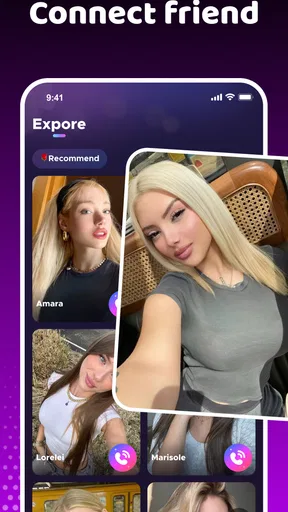
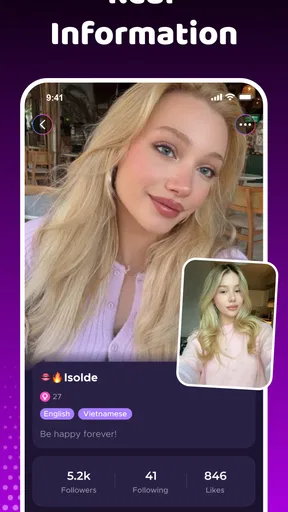
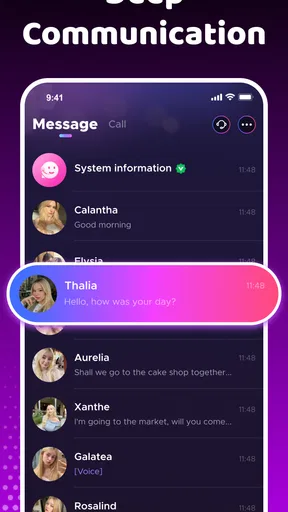
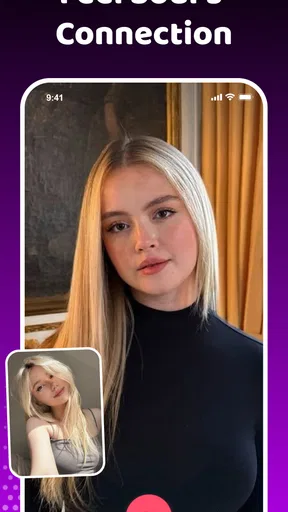
 Analysis by AppCompare
I tried Buzar: Live Video Chat as a social app built around meeting people through video conversations, and my first impression was that it aims for a more immediate experience than ordinary profile-based networks. You are not simply scrolling through posts or waiting for a long message exchange. The central idea is to connect with people worldwide through live video and calls, which makes the app feel more personal but also demands more attention from the user.
Buzar is free to install, with optional in-app purchases ranging from $0.49 to $199.99 per item. It is intended for mature users aged 17 and above, so I would not treat it as a casual app for younger teenagers. The developer is Hangzhou Yuhang Nianwu, and the app belongs to the social category rather than dating, messaging, or entertainment alone. That distinction matters: its appeal depends on real-time interaction, not on building a carefully edited feed.
How the everyday Buzar experience works
The most natural way to use Buzar is in short sessions. I would open it when I had enough time for an unexpected conversation, rather than launching it while distracted or in a noisy public place. Video chat is less forgiving than text: lighting, background noise, camera position, and your willingness to speak all affect the experience immediately.
A useful baseline routine is simple. I check that the front camera is at a comfortable angle, make sure my surroundings are suitable for a conversation, and decide whether I am in the mood to meet someone new. That small preparation makes a bigger difference here than it would in a conventional social network. If you start a live interaction while multitasking, the conversation can feel rushed and the other person may assume you are not interested.
The app is strongest for people who enjoy spontaneous contact. If you like discovering different personalities, practicing casual conversation, or making international connections without composing a perfect opening message, Buzar has a clear attraction. It removes some of the hesitation found in text-first apps because facial expressions and tone provide context right away.
At the same time, live video creates a higher social cost when a connection is awkward. With a messaging app, you can pause and answer later. In Buzar, you need to decide quickly whether to continue, end the interaction, or move on. I found that this makes the app exciting in the right mood, but tiring when I wanted quiet browsing.
A realistic use case for short sessions
Imagine finishing work or study and having twenty minutes before dinner. You want to talk to someone outside your usual circle, but you do not want to maintain a full social profile. Buzar fits that moment better than a traditional feed. I would use it from a private, well-lit room, keep the first conversation light, and avoid treating every connection as something that must become a long-term friendship.
Worth Reading Before You Choose

EA SPORTS FC Mobile 26 Is a Bigger Football Game, but It Takes Time

Flipboard Shows What News Apps Must Do Beyond the Feed

Switching to Android Auto Means Rethinking Your Driving Routine

Google Calendar Makes a Crowded Week Easier to Manage

Ludo King Makes the Most of the Minutes Between Plans

Baby Panda World Brings Quick Play to Modern Phones, but Its Game Library Feels Busy
That last point is important. The app can help create an opening for conversation, but the quality of a connection still depends on both people. A smooth video call does not automatically mean shared interests, trust, or compatibility. I recommend judging each interaction on its own instead of assuming that a friendly first chat guarantees a reliable contact later.
Settings and habits worth checking first
Before spending much time in any live social app, I would review the available account, notification, camera, microphone, and privacy controls. I am not claiming that every control is presented in the same place or that Buzar offers a particular advanced safety tool. My practical advice is to inspect what the current version exposes before beginning regular conversations, especially if you prefer tight control over alerts or device access.
Notifications deserve special attention. Live-oriented apps can become distracting when every interaction tries to pull you back in. I prefer keeping only the alerts that help me notice meaningful activity and silencing anything that interrupts work, sleep, or family time. If Buzar becomes part of your daily routine, notification discipline is more valuable than leaving every alert active.
Camera and microphone checks are equally practical. A poor angle can make a conversation uncomfortable, while background noise can make a good connection difficult to follow. I would test the phone in the same place where I expect to use the app, because a setup that works in a quiet bedroom may fail beside traffic, a television, or other people.
There is also a privacy habit that matters more than any single toggle: keep the first conversations general. I would avoid showing documents, work screens, home addresses, school details, travel plans, or other identifying information in the background. Video reveals more than text, sometimes unintentionally. A plain wall or controlled room is a better starting point than a setting full of personal clues.
Because the app is rated Mature 17+, I would also take its audience seriously. Adults should still use judgment, and younger users should not be encouraged to bypass age restrictions. If you are choosing a social app for a family member, Buzar would not be my first recommendation for a child or young teen simply because live video requires more active supervision than text-based communication.
Faster patterns for experienced users
After the initial setup, the best way to make Buzar feel less random is to create a repeatable personal workflow. I would decide in advance what kind of session I want: a brief conversation, an attempt to meet people from another region, or a relaxed period of discovery. That intention helps me leave conversations that are not a good fit instead of staying out of politeness.
Another useful pattern is to keep opening questions ready, but not scripted so rigidly that the exchange feels artificial. Questions about hobbies, languages, food, music, or everyday routines are easier to answer than demanding personal questions. They also give both people a quick way to find common ground. If the conversation remains one-sided after a few attempts, I take that as a reason to move on.
I would also separate discovery from follow-up. The first live contact should be treated as a quick introduction, not as proof that someone is trustworthy. If a conversation goes well, I still prefer to keep future contact inside the app until I have enough reason to feel comfortable. Requests for money, urgent favors, private documents, or immediate movement to another platform are warning signs, regardless of how friendly the call seems.
One non-obvious advantage of this approach is that it protects your energy. The app is designed around meeting people, but you do not have to accept every interaction as a commitment. Short, intentional sessions reduce the chance that the novelty turns into endless, low-quality scrolling or repetitive conversations.
It is also worth remembering that international conversation brings differences in humor, directness, time zones, and expectations. A brief pause or unusual expression does not always mean disinterest. I try to clarify politely before judging a person, while still ending the interaction when I feel uncomfortable. That balance makes the experience more respectful without requiring me to tolerate behavior I dislike.
Where Buzar differs from familiar alternatives
Compared with a standard messaging app, Buzar offers faster emotional context. You can hear tone and see reactions instead of interpreting every sentence. That is useful when the goal is genuine conversation, language practice, or meeting someone whose personality might not come through in a profile.
Compared with a large social feed, it is less useful for passive consumption. A feed lets you follow interests, revisit posts, and control the pace. Buzar asks you to participate in the moment. I would choose the feed-based alternative when I want news, hobbies, communities, or a record of ongoing discussions. I would choose Buzar when the main goal is direct human contact.
Compared with a text-first matching service, Buzar can reveal compatibility earlier, but it also exposes you to awkwardness earlier. Text gives you time to think and offers more distance. Live video is more honest in some ways, yet that honesty can feel intense. Users who dislike spontaneous calls may find a conventional messaging service more comfortable and more efficient.
The app’s worldwide focus is appealing, but it should not be confused with a guaranteed way to find deep friendships. Geographic variety increases the range of possible conversations; it does not remove the need for patience, boundaries, or shared interests. I see Buzar as a meeting point, not a complete relationship-management tool.
Limits, costs, and points requiring judgment
The free entry point makes it easy to try, but the presence of paid items means I would pay attention before purchasing anything. The individual purchase range starts at $0.49 and reaches $199.99, which is a wide gap. I would never buy simply because a prompt creates urgency, and I would review the purchase confirmation carefully before approving it.
That pricing structure may suit users who want optional extras, but it can be uncomfortable for anyone who prefers a completely predictable social experience. If you are handing the phone to a younger family member, purchase controls on the device become especially important. The mature age rating and optional spending together make this an app I would use with clear boundaries rather than casually leaving open for someone else.
Another limitation is the emotional unpredictability of live interaction. Some sessions may be engaging, while others may be brief, repetitive, or uncomfortable. That is not necessarily a technical failure; it is a consequence of the format. Still, users expecting the consistency of a curated community may feel disappointed.
Connection quality also matters, even though I would not judge the app solely by a single call. Video is more demanding than text, and a weak network, poor lighting, or an older device can make the experience less pleasant. If calls regularly feel difficult, I would first improve the environment and connection before deciding whether the whole service is unsuitable.
Safety is another reason to stay realistic. A live face and voice can create a sense of familiarity very quickly, but neither proves identity or good intentions. I would not share financial information, private credentials, intimate material, or precise location details with a new contact. If someone pressures you to ignore your boundaries, ending the interaction is the right response.
What the current version tells me about its place
Buzar was released on November 22, 2024, and the current version is 1.2.0. Its average rating is 4.5 from around 66 thousand ratings, while the store shows 101 written reviews. More than 5 million installs indicate that the concept has reached a substantial audience, but popularity alone does not guarantee that every conversation will suit every user.
I read those figures as a reason to try the app thoughtfully, not as a substitute for personal judgment. A large audience can improve the chance of finding someone interesting, yet it can also make the experience feel varied from session to session. The app’s value depends heavily on your expectations and on how carefully you manage your time, privacy, and spending.
Device compatibility is relatively approachable because it supports Android 5.1 and later. That makes it relevant to people who are not using a recent phone, although the practical quality of video still depends on the individual device, camera, microphone, and network. I would test it on the phone I actually plan to use rather than assuming that broad system support guarantees a perfect call.
Who should use it and who should skip it
I would recommend Buzar to adults who enjoy spontaneous video conversations and want to meet people beyond their existing social circle. It is particularly suitable for someone who can handle brief awkward moments, respects boundaries, and is willing to judge connections gradually. It may also appeal to users who find text introductions too slow or impersonal.
I would suggest skipping it if you strongly dislike appearing on camera, need complete control over the pace of every exchange, or want a structured community organized around a specific hobby. A forum, group chat, or text-based network will probably serve you better in those cases. I would also avoid making it your first choice if predictable costs are essential, since optional purchases can vary considerably in size.
For someone seeking a serious, carefully filtered relationship platform, I would look at services designed specifically for that purpose. Buzar can create introductions, but its live social format does not replace detailed compatibility tools or the slower trust-building those services encourage.
My final view after using the workflow
Buzar works best when you treat it as a focused doorway into conversation, not as an endless social obligation. Its live format gives it more immediacy than ordinary messaging, and the worldwide angle makes each session potentially different. I like that it can move past polished profiles and bring personality into the first exchange.
My recommendation comes with conditions: check the controls, protect your background and personal information, keep sessions intentional, and approach purchases carefully. The app is free to start, but the mature audience and broad in-app purchase range call for adult judgment. I would also accept that some conversations will be forgettable or uncomfortable rather than expecting constant success.
Overall, I see Buzar as a worthwhile option for socially curious adults who genuinely want live contact and can manage its unpredictability. It is not the best fit for passive browsing, highly structured communities, or users who prefer the safety of long text conversations before showing their face. Used with sensible habits, however, it offers a direct and lively way to meet people worldwide, and that is a meaningful alternative to the usual social feed.
Pros
- Quick way to meet people through live video conversations.
- Video interactions feel more personal than text-based social apps.
- Simple interface makes browsing live chats easy for newcomers.
- Useful for practicing communication with people from different backgrounds.
- Live format can create spontaneous and entertaining conversations.
Cons
- Video chat may consume significant mobile data and battery.
- The quality of conversations depends heavily on who is online.
- Unexpected interactions may not suit users seeking a calmer social app.
- Some features or interactions may require in-app purchases.
- Users should remain cautious about sharing personal information on live video.
FAQs for Buzar: Live Video Chat
What is Buzar: Live Video Chat used for?
Buzar: Live Video Chat is designed for meeting people through live video conversations and social interaction. Users can browse available profiles or live sessions, start chats, and discover new contacts from different locations. The experience is focused on spontaneous communication, so it may be more suitable for adults who enjoy meeting unfamiliar people rather than users looking for a traditional messaging app.
Is Buzar: Live Video Chat free to download and use?
The application can generally be downloaded without an upfront purchase, but some features may require in-app credits, subscriptions, or other payments. Video calls, premium interactions, profile visibility, or virtual gifts can be limited depending on the account and current app policies. Before spending money, check the pricing page carefully and review whether recurring subscriptions are enabled.
Is Buzar: Live Video Chat safe for meeting strangers?
As with any live video chat platform, users should be careful when communicating with people they do not know. Avoid sharing your address, phone number, passwords, financial details, or private documents. Use the app’s blocking and reporting tools if someone behaves inappropriately, and remember that profiles may not always represent a person accurately. Younger users should only use the service if its age requirements permit it and with appropriate supervision.
Does Buzar require a camera, microphone, or account registration?
The main video-chat functions normally require access to your device’s camera and microphone, while account registration may be needed to create a profile, save preferences, or access certain social features. You can review these permissions during setup and change them later in Android or iOS settings. If you deny camera or microphone access, some communication features may not work as intended.
What should I check before downloading Buzar: Live Video Chat?
Before installing Buzar, check the app’s current age rating, privacy policy, supported country or region, and recent user reviews. It is also worth confirming how personal information, photos, video data, and chat activity are handled. Review the in-app purchase terms, cancellation instructions, and notification settings as well. A stable internet connection and sufficient storage are recommended for smoother live video performance.


